Who builds what using assessment software? [FAQ]

Written February 19, 2026, by Stefan Debois

In a nutshell: across industries, diverse types of professional service providers are transforming their expertise into scalable digital solutions, using assessment software. From consulting firms and corporate HR departments to healthcare networks and insurance companies. They’re all knowledge-based organizations that build assessment tools to deliver personalized insights at scale. 

The answer above uncovers merely the tip of the iceberg. As co-founder and CEO of Pointerpro, I get asked who uses assessment software and what for exactly, all the time. And it’s nearly impossible to formulate a complete answer, because the user-bases are so vast. 

This article will hopefully help people understand how different professionals in different sectors deploy the capabilities of assessment software. My goal is to inspire you to start digitizing your own expertise too. I will update this article as often as possible, so don’t hesitate to get in touch with me if you have any questions or comments.

Let’s break it down by industry and segments:

  • Pointerpro icon Orange (3)

    Business and consulting services

  • Pointerpro icon Orange (3)

    Coaching and training firms

  • Pointerpro icon Orange (3)

    Corporate HR

(I’ll break this down in more detail in the future, but this should give you an idea already)

How do business and consulting services use assessment software?

Consulting and professional services firms face a persistent challenge: how to scale expert diagnostic work without sacrificing quality or personalization. Traditional discovery processes like interviewing stakeholders, analyzing data and synthesizing findings can take weeks per client and don’t differentiate firms in competitive pursuits. 

Assessment software solves this by codifying diagnostic frameworks into automated tools that deliver personalized insights instantly. The result: consultants can diagnose more opportunities, demonstrate expertise earlier in the sales cycle, and create repeatable intellectual property that turns methodology into measurable business value.

1. Building maturity and benchmark assessments with personalized advisory reports

Diagnostic assessments that measure current state across key dimensions, benchmark performance against industry peers, and generate tailored improvement roadmaps have become foundational tools for consultants.

  • Pointerpro icon Orange (3)

    Common synonyms: Maturity model, capability assessment, organizational health check, diagnostic assessment, benchmark study, current-state analysis, readiness scan.

  • Pointerpro icon Orange (3)

    Business value: These assessments accelerate discovery conversations, establish expertise before the first meeting, and create natural pathways to advisory engagements. Instead of spending weeks on manual analysis, firms deliver personalized diagnostic reports in minutes while positioning themselves as trusted advisors.

What are assessment software requirements for maturity assessment in consulting?

Key requirements

  • Pointerpro icon Orange (3)

    Custom scoring and formulas power the assessment logic that calculates maturity levels across different dimensions. These formulas transform raw responses into meaningful scores that can be compared against benchmarks or industry standards.

  • Pointerpro icon Orange (3)

    Personalized PDF reports present findings in a professional, branded format that clients can share internally. The report should automatically adapt its content based on the assessment results, highlighting relevant strengths, gaps, and recommendations specific to each respondent.

Branded assessment reports
  
Email reminders
  
  • Pointerpro icon Orange (3)

    Group/aggregated reports with predefined filters enable peer benchmarking by combining individual results into comparative views. Filters let users explore results by industry, company size, region, or other relevant segments to understand where they stand relative to peers.

Game-changer requirements

  • Pointerpro icon Orange (3)

    Basic results dashboards allow for interactive insights. Stakeholders can explore results, filter by different dimensions, and derive their own insights without requesting custom analysis.

  • Pointerpro icon Orange (3)

    Custom dashboards give you control to create targeted views tailored to different audiences – executive summaries for leadership, detailed breakdowns for implementation teams, or benchmark comparisons for sales conversations.

  • Pointerpro icon Orange (3)

    PowerPoint report capability converts assessment results into presentation-ready decks. Instead of manually recreating findings in slides, consultants can generate client-ready presentations automatically, saving hours of formatting work.

  • Pointerpro icon Orange (3)

    Email invitations and contact lists streamline distribution at scale. Rather than managing assessment links manually, you can invite entire contact lists, track completion rates, and send automated reminders. This is essential when running assessments across multiple client organizations.

  • Pointerpro icon Orange (3)

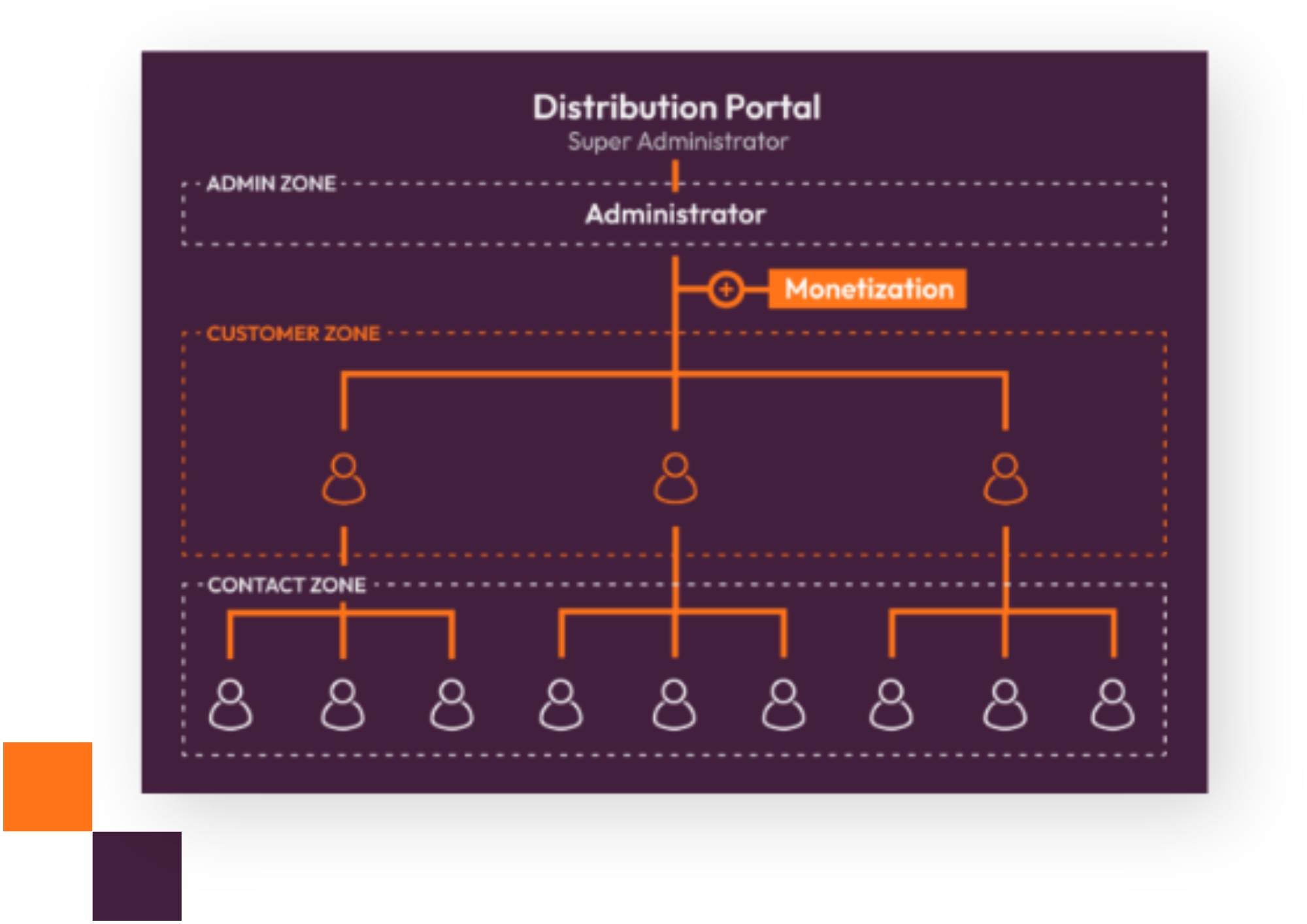
    Distribution portal for multi-client rollouts becomes critical when you’re managing assessments across dozens of client organizations. A portal lets each client manage their own contacts, invite their teams to take assessments, and access their reports independently while you maintain oversight and aggregate insights across your entire portfolio.

Assessment distribution portal mechanism
  

2. Creating readiness and gap analyses

Whether clients face digital transformation, regulatory compliance, or market expansion, readiness assessments quantify exactly where they stand against the target state – and what it takes to close the gap.

  • Pointerpro icon Orange (3)

    Common synonyms: Gap analysis, transformation readiness, compliance assessment, implementation readiness, change readiness evaluation, target-state comparison, preparedness audit.

  • Pointerpro icon Orange (3)

    Business value: Shortens sales cycles by replacing lengthy scoping conversations with data-driven diagnostics. Creates repeatable intellectual property that can be deployed across similar engagements, turning expertise into scalable assets that drive advisory projects.

What are assessment software requirements for readiness and gap analyses?

Key requirements

  • Pointerpro icon Orange (3)

    Formulas and custom scoring calculate the distance between current state and target state across multiple dimensions. These formulas need to handle complex logic that can weight different factors, account for dependencies between capabilities, and translate responses into quantified gap scores.

  • Pointerpro icon Orange (3)

    Personalized PDF reports present the gap analysis in a clear, actionable format. The report should automatically highlight the most critical gaps, explain what “good” looks like for each dimension, and provide a prioritized roadmap based on the specific gaps identified for each organization.

  • Pointerpro icon Orange (3)

    Dynamic report recommendations translate gap scores into concrete next steps. Rather than just showing what’s missing, the system should prescribe specific actions, resources, or initiatives based on the pattern of gaps – connecting diagnosis directly to remediation.

  • Pointerpro icon Orange (3)

    Group/aggregated reports allow you to compare readiness across departments, business units, or client organizations. This reveals which areas are furthest from the target state and helps prioritize where transformation efforts should focus first.

Game-changer requirements

  • Pointerpro icon Orange (3)

    Report scheduler for periodic updates transforms readiness assessment from a one-time snapshot into a progress-tracking tool. Schedule reassessments at 30, 60, or 90-day intervals to measure how gaps are closing over time and demonstrate the impact of transformation initiatives.

Email reminders (2)
  • Pointerpro icon Orange (3)

    Results dashboard gives stakeholders real-time visibility into readiness status without waiting for formal reports. Executives can see aggregate readiness scores, track progress against milestones, and identify emerging risks as teams complete periodic reassessments.

  • Pointerpro icon Orange (3)

    Custom dashboards let you create custom views for different stakeholder groups – transformation leaders need gap priorities and progress trends, while executive sponsors want high-level readiness status and risk indicators. Build distinct dashboards for each audience from the same underlying assessment data.

3. Developing ROI calculators or business case generators

Moving from diagnosis to decision requires quantification. Value calculators collect client-specific inputs and automatically generate executive-ready business cases showing projected ROI.

  • Pointerpro icon Orange (3)

    Common synonyms: Value calculator, ROI estimator, business case tool, investment justification calculator, TCO analyzer, savings calculator, financial impact assessment.

  • Pointerpro icon Orange (3)

    Business value: Dramatically increases proposal conversion rates by making the financial argument tangible and personalized. Firms can deliver compelling business cases at scale without custom spreadsheet work for each opportunity.

What are assessment software requirements for ROI calculators and business case generators?

Key requirements

  • Pointerpro icon Orange (3)

    Advanced formulas including mathematical functions are the engine of any ROI calculator. You need the ability to perform complex calculations – NPV, IRR, payback periods, compound growth rates – and chain multiple formulas together to model scenarios like cost savings over time, revenue impact, or total cost of ownership comparisons.

ROI calculation formula setup in Pointerpro
  • Pointerpro icon Orange (3)

    Personalized PDF outputs present the business case in a polished, executive-ready format. The report should clearly articulate the financial logic, show key assumptions, visualize ROI over time, and present the investment narrative in a way that stakeholders can confidently take to their leadership team or board.

Automated ROI calculation stakeholder report example
  • Pointerpro icon Orange (3)

    Outcomes that translate calculations into recommendations bridge the gap between numbers and decisions. Based on the calculated ROI, the system should surface relevant next steps – whether that’s “strong business case, recommended to proceed,” “marginal ROI, consider these optimization opportunities,” or “insufficient return, explore alternative approaches.”

Streamlining stakeholder and 360 client feedback

Client retention depends on understanding satisfaction across all touchpoints. Multi-rater assessments gather input from sponsors, end users, and project teams, then synthesize everything into coherent health-check reports.

  • Pointerpro icon Orange (3)

    Common synonyms: 360 feedback, multi-rater assessment, stakeholder survey, client satisfaction assessment, project health check, relationship review, vendor scorecard.

  • Pointerpro icon Orange (3)

    Business value: Improves retention by surfacing issues early, demonstrates measurable impact to renew and expand relationships, and identifies white-space opportunities within existing accounts.

What are assessment software requirements for stakeholder and 360 client feedback?

Key requirements

  • Pointerpro icon Orange (3)

    360 reporting patterns using predefined formula filters by rater group are essential for multi-rater assessments. The system needs to automatically segment responses by role (client sponsor, end user, peer, project manager) and calculate separate scores for each group, then synthesize these into a coherent view that shows where perspectives align or diverge.

  • Pointerpro icon Orange (3)

    Group vs. individual report configuration gives you control over what each stakeholder sees. Individual recipients get personalized feedback showing how different rater groups perceive their performance or the project health, while you maintain aggregate reports that reveal patterns across multiple client relationships or projects.

  • Pointerpro icon Orange (3)

    Email invitations streamline the multi-rater collection process. You need the ability to send targeted invitations to different stakeholder groups, each with appropriate context about their role in the feedback process, and track completion rates to ensure you’re getting balanced input from all perspectives.

  • Pointerpro icon Orange (3)

    Contacts and lists organize the complex web of relationships in multi-rater feedback. Managing who rates whom, ensuring the right people receive the right invitations, and maintaining the structure of client sponsor → end users → delivery team relationships requires robust contact management capabilities.

Contact list management in Pointerpro

4. Carrying out solution fit or prescriptive assessments

Not every prospect needs the same solution. Prescriptive assessments qualify leads, determine product or methodology fit, and automatically route prospects to appropriate next steps or service packages.

  • Pointerpro icon Orange (3)

    Common synonyms: Product fit assessment, lead gen quiz, solution selector, customer needs analysis, qualification quiz, prescriptive diagnostic, methodology matcher, service recommender.

  • Pointerpro icon Orange (3)

    Business value: Enables inbound qualification at true scale with personalized follow-up that feels consultative rather than automated. The right prospects get the right conversations without manual triage, improving conversion while reducing sales overhead.

Downloadable PDF report

What are assessment software requirements for solution fit or prescriptive assessments?

Key requirements

  • Pointerpro icon Orange (3)

    Custom scoring and formulas for qualification logic power intelligent lead routing and product matching. The system needs to evaluate multiple factors company size, current challenges, budget indicators, technical readiness, urgency signals – and synthesize these into qualification scores or fit categories that determine which solution, service tier, or engagement model best matches each prospect’s needs.

  • Pointerpro icon Orange (3)

    Personalized PDF reports transform qualification assessments into value-generating sales assets. Rather than just scoring leads internally, provide prospects with a tangible deliverable – a needs analysis summary, readiness evaluation, or solution recommendation report – that demonstrates your expertise, validates their investment in completing the assessment, and creates a natural artifact for continuing the sales conversation.

  • Pointerpro icon Orange (3)

    Outcomes for tailored recommendations and routing ensure each prospect receives relevant next steps based on their assessment results. High-fit enterprise prospects get routed to senior sales with custom proof-of-concept offers, mid-market leads receive product demos focused on their specific use case, and early-stage prospects get educational nurture sequences – all determined automatically by assessment responses rather than manual review.

  • Pointerpro icon Orange (3)

    Question logic for adaptive pathways keeps assessments concise and relevant by showing only pertinent questions. If a prospect indicates they’re in healthcare, skip questions about retail-specific challenges and dive deeper into compliance and patient data topics- creating a consultative experience that demonstrates you understand their world.

Game-changer requirements

  • Pointerpro icon Orange (3)

    Email automation for follow-up sequences bridges assessment completion to sales engagement without manual handoffs. Automatically trigger different email sequences based on qualification scores – immediate sales rep introduction for high-fit leads, educational content series for nurture-track prospects, or partner referrals for leads outside your ideal customer profile – ensuring no prospect falls through the cracks while sales focuses on the highest-potential conversations.

  • Pointerpro icon Orange (3)

    Integrations with spreadsheets, CRM and other platforms ensure assessment insights flow into your existing sales and marketing systems. Automatically create or enrich CRM records with qualification scores, solution fit indicators, and specific pain points mentioned in the assessment – giving sales reps full context before their first conversation and enabling marketers to build precise nurture segments based on assessment-derived insights.

How do coaching and training firms use assessment software?

1. Conducting learning needs analyses

Identifying skill gaps and mapping respondents to appropriate learning paths ensures training investments deliver maximum impact.

  • Pointerpro icon Orange (3)

    Common synonyms: Skills gap assessment, training needs analysis, competency assessment, learning readiness evaluation.

  • Pointerpro icon Orange (3)

    Business value: Improves training relevance and utilization by matching individuals to precisely what they need rather than generic curricula.

What are assessment software requirements for learning needs analyses?

Key requirements

  • Pointerpro icon Orange (3)

    Personalized competency gap analysis and recommendations transform raw skill assessment data into actionable learning paths. The system should identify specific competency gaps for each individual, compare their current proficiency against role requirements or organizational standards, and automatically recommend relevant courses, resources, or development activities based on their unique gap profile.

    As an example: Piscari is a sales and negotiation coaching business, founded by an ex-procurement director, Mike Lander. The firm assesses individual skills to get the most out of any type of sales profile. Auto-personalized development reports based on training needs analysis have been instrumental in their engagement with clients.

Learning needs analysis example Sales negotiation skills
  
  • Pointerpro icon Orange (3)

    Email invitations/templates for class cohorts streamline the distribution of needs analyses across training programs. You need the ability to invite entire cohorts – whether that’s a leadership development program, technical certification track, or onboarding class – with consistent messaging that explains the assessment’s purpose and how results will inform their personalized learning journey.

  • Pointerpro icon Orange (3)

    Dashboards for skills heatmaps provide program-level intelligence that goes beyond individual reports. Visualize skill gaps across the entire cohort to identify common deficiencies that warrant dedicated sessions, spot outliers who need specialized support, and demonstrate to program sponsors exactly where their training investment should focus for maximum impact.

Game-changer requirements

  • Pointerpro icon Orange (3)

    Learning path routing based on assessment results closes the loop between diagnosis and action. Rather than simply telling someone they have a gap in “strategic thinking” or “data analysis,” automatically enroll them in the appropriate learning track, send personalized course recommendations, or trigger follow-up communications from instructors – turning needs analysis into immediate developmental action. Native integration features or tools like Zapier are highly valuable here.

  • Pointerpro icon Orange (3)

    Pre-post comparison reporting transforms needs analysis from a one-time diagnostic into evidence of learning impact. Administer the same competency assessment before and after training programs to quantify skill development, demonstrate ROI to program sponsors, and identify which learning interventions actually close gaps versus which fall short. For this type of longitudinal reporting, aggregate report features allow you to merge response data from different points in time into flawless reports with a dynamic narrative.

2. Conducting personality or behavioral style assessments

Providing style profiles and suitable development paths creates differentiated intellectual property that clients value and return for repeatedly.

  • Pointerpro icon Orange (3)

    Common synonyms: Personality assessment, behavioral profile, working style inventory, leadership style diagnostic.

  • Pointerpro icon Orange (3)

    Business value: Differentiated coaching product with built-in repeatability across teams and organizations.

What are assessment software requirements for personality or behavioral style assessments?

Key requirements

  • Pointerpro icon Orange (3)

    Personalized reports with conditional text blocks and tips bring style assessments to life. Based on response patterns, the system should assemble narrative descriptions of the individual’s style, explain behavioral tendencies in different situations, provide actionable tips for leveraging strengths and managing blind spots, and offer guidance for working effectively with other styles—all dynamically generated based on their unique profile.

  • Pointerpro icon Orange (3)

    White labeling for branded experience ensures your assessment feels like a premium proprietary product rather than generic software. Custom branding, your logo on reports and emails, personalized domains, and consistent visual identity throughout the assessment experience reinforce that this is your unique methodology and intellectual property.

    One best practice example is
    ResilienceBuilder®. Founder Steve Howe developed a proprietary framework in a tangible, branded assessment product, subscribed to by coaches worldwide (more info in this interview)

Branded assessment IP example ResielienceBuilder

Game-changer requirements

  • Pointerpro icon Orange (3)

    Distribution portal to sell/distribute to client teams enables scalable deployment of your proprietary assessment across client organizations. Rather than manually managing individual assessment links, client managers can log into a portal, invite their team members, monitor completion rates, and access all results in one place. It turns your assessment into a team development tool rather than just an individual diagnostic.

  • Pointerpro icon Orange (3)

    Team composition reports take personality assessments beyond individual insights. Automatically generate team-level reports that show the distribution of styles across a team, identify potential collaboration friction points, highlight missing perspectives or over-indexed tendencies, and provide specific recommendations for how this particular team configuration should approach communication, decision-making, and conflict resolution.

  • Pointerpro icon Orange (3)

    Multi-language support dramatically expands your market for proprietary assessments. The ability to deliver the same assessment and generate reports in multiple languages allows you to scale your coaching methodology globally while maintaining consistency in the underlying framework and scoring.

Multi language capabilities in assessments

3. Carrying out 360-degree feedback assessments

Collecting self, manager, and peer feedback and generating development reports has become a cornerstone deliverable for coaching practices.

  • Pointerpro icon Orange (3)

    Common synonyms: 360 review, multi-rater feedback, leadership assessment, developmental feedback, peer review assessment.

  • Pointerpro icon Orange (3)

    Business value: Creates scalable, standardized coaching deliverables that maintain quality across growing client bases while demonstrating measurable development impact.

What are assessment software requirements for 360-degree feedback assessments?

Key requirements

  • Pointerpro icon Orange (3)

    The system should let you set up rater groups (self, manager, peers, direct reports), automatically aggregate scores by rater category while protecting individual anonymity, and generate personalized feedback reports that show each participant how different stakeholder groups perceive their competencies. This highlighting alignment and gaps between self-perception and others’ views.

Aggregated rater group scores thanks to predefined filters
  
  • Pointerpro icon Orange (3)

    Group/aggregate reports for cohort summaries reveal patterns across an entire leadership cohort or development program. While individuals receive their personal 360 results, you need cohort-level reports that show common development themes, identify organizational strengths and gaps, and provide program sponsors with evidence of where leadership capabilities are strong versus where systemic development is needed.

  • Pointerpro icon Orange (3)

    Distribution portal for client HR access enables client organizations to manage their own 360 processes under your methodology. HR business partners can log in, nominate participants for 360 assessments, invite raters, monitor completion, and access results – all while you maintain oversight, ensure process integrity, and provide expert interpretation of findings.

Game-changer requirements

  • Pointerpro icon Orange (3)

    Custom dashboards for live cohort tracking gives program managers real-time visibility into 360 assessment progress and participation. Track completion rates across different rater groups, identify where you’re missing critical perspectives (all self-assessments complete but few peer ratings), and monitor engagement throughout multi-wave 360 processes that measure development over time.

How do corporate HR departments use assessment software?

1. Offering leadership self-assessments

Assessing leadership strengths and gaps while creating tailored development plans scales leadership development across large organizations.

  • Pointerpro icon Orange (3)

    Common synonyms: Leadership assessment, competency evaluation, management effectiveness review, leadership capabilities inventory.

  • Pointerpro icon Orange (3)

    Business value: Enables scalable leadership development with personalized reports that maintain individual relevance while providing aggregate insights for talent planning.

What are assessment software requirements for leadership self-assessments?

Key requirements

  • Pointerpro icon Orange (3)

    Personalized competency-based advice reports translate self-assessment responses into actionable development guidance. Based on identified strengths and gaps across leadership competencies, the system should generate tailored recommendations – specific development actions, relevant learning resources, stretch assignments to consider, or coaching focus areas – that feel personally relevant rather than generic leadership advice.

  • Pointerpro icon Orange (3)

    Dashboards for population insights elevate leadership assessments from individual development tools to strategic talent intelligence. HR should be able to visualize leadership capability distributions across the organization, identify competency gaps by level or function, spot high-potential clusters, and track how leadership strengths evolve over time. This informs succession planning, targeted development investments, and organizational capability building.

  • Pointerpro icon Orange (3)

    Distribution portal roles for global vs. local HR administration enable enterprise-scale deployment with appropriate governance. Global talent teams can design the core leadership framework and assessment, regional HR can manage rollout within their geographies, and local HR business partners can invite their leaders and access results – all with role-based permissions that balance standardization with local ownership.

Game-changer requirements

  • Pointerpro icon Orange (3)

    Development plan templates integrated with assessment results close the loop between diagnosis and action. Rather than just identifying gaps, automatically populate development plan templates with assessment-derived priorities, suggested actions based on specific competency scores, and tracking mechanisms for progress. This gives leaders and their managers a structured starting point for development conversations.

  
  • Pointerpro icon Orange (3)

    Longitudinal tracking and progress measurement transforms one-time assessments into ongoing development journeys. Enable leaders to retake assessments annually or after development milestones to measure growth, visualize competency progression over time, and demonstrate the impact of development investments at both individual and organizational levels.

2. Organizing manager 180 or 360 assessments

Standardizing performance feedback for managers creates consistency while personalizing development guidance.

  • Pointerpro icon Orange (3)

    Common synonyms: Manager feedback, leadership 360, performance review assessment, managerial effectiveness survey.

  • Pointerpro icon Orange (3)

    Business value: Delivers standardized performance feedback at scale while maintaining individual developmental value.

What are assessment software requirements for manager 180 or 360 assessments?

Key requirements

  • Pointerpro icon Orange (3)

    360 setup resources and personalized reports handle the structural complexity of multi-rater manager assessments. The system should guide you through configuring rater relationships (manager rates direct report, peers rate each other, direct reports rate their manager), maintain confidentiality thresholds (requiring minimum peer or direct report responses before sharing aggregated feedback), and generate personalized reports that synthesize perspectives from multiple stakeholder groups while highlighting where a manager’s self-perception aligns or differs from how others experience their leadership.

360 personalized report example
  
  • Pointerpro icon Orange (3)

    Group/aggregate reports for unit-level summaries provide organizational intelligence beyond individual feedback. HR and senior leaders need to see management capability patterns across departments, business units, or the entire organization – identifying where management practices are strongest, which units show concerning feedback trends, and where targeted management development interventions would have the greatest impact.

  • Pointerpro icon Orange (3)

    Email invitations/templates to raters streamline the logistically complex process of collecting feedback from multiple stakeholder groups. Different rater categories (managers, peers, direct reports) need different invitation messaging explaining their role, the confidentiality protections in place, and why their candid input matters – with automated reminders that increase completion rates without manual follow-up from HR.

Email automation in a 360 review process

3. Administering skills gap assessments

Mapping current versus target skills informs reskilling programs and workforce planning initiatives.

  • Pointerpro icon Orange (3)

    Common synonyms: Competency gap analysis, skills inventory, workforce capability assessment, talent gap evaluation.

  • Pointerpro icon Orange (3)

    Business value: Enables targeted L&D investment and strategic workforce planning based on actual capability data rather than assumptions.

What are assessment software requirements for skills gap assessments?

Key requirements

  • Pointerpro icon Orange (3)

    Personalized gap output reports show each employee exactly where they stand against role requirements or organizational skill standards. The report should clearly identify current proficiency levels, highlight priority skill gaps based on their role or career aspirations, and recommend specific learning pathways or development activities to close the most critical gaps. It makes the abstract concept of “skills development” concrete and actionable.

  • Pointerpro icon Orange (3)

    Custom dashboards for skills heatmaps transform individual skill data into workforce intelligence. HR and business leaders need to visualize skill distribution across teams, departments, or the entire organization – quickly identifying where critical capabilities are concentrated or missing, which teams are most prepared for strategic initiatives, and where reskilling investments would address the most significant organizational gaps.

  • Pointerpro icon Orange (3)

    Group/aggregate reporting across departments or business units enables comparative workforce analysis. See which departments have stronger technical capabilities versus leadership skills, compare skill profiles across geographies to inform talent mobility decisions, or benchmark business units against each other to identify pockets of excellence and areas needing targeted development. This informs both local interventions and enterprise-wide capability building strategies.

Game-changer requirements

  • Pointerpro icon Orange (3)

    Role-based skill profiles and gap calculations automate the comparison between current capabilities and what’s actually needed. Define skill requirements for different roles or levels, then automatically calculate gaps when employees assess themselves. This eliminates manual comparison work and ensures gap analysis stays current as role requirements evolve with business strategy.

  • Pointerpro icon Orange (3)

    Skills trending and future-state modeling elevates skills assessment from current-state diagnosis to strategic workforce planning. Track how organizational skill profiles change over time, model future skill needs based on strategic initiatives, and identify the magnitude of reskilling required to close the gap between today’s capabilities and tomorrow’s requirements. It gives workforce planning conversations concrete data instead of speculation.

What is the common thread in professional assessments?

Each use case shares a common pattern: transforming professional expertise into structured diagnostic processes that scale while maintaining personalization. 

I will complement this overview with use case examples from an even broader array of industries and segments soon. You will notice in almost all cases the assessment becomes both a discovery tool and a delivery mechanism for insights that would traditionally require manual time.

Until that update, I hope this overview is already helpful for many, and again don’t hesitate to get in touch with me directly or with my assessment solution experts at Pointerpro.

Want to know more?

Subscribe to our newsletter and get hand-picked articles directly to your inbox

Please wait..
Your submission was successful!

Create your own assessment
for free!

People also ask

Healthcare providers, hospital networks, and private practices use assessment software to digitize patient intake, triage, risk screening, and treatment readiness evaluations.

Instead of relying solely on in-person consultations, structured digital assessments collect patient-reported data in advance and automatically flag high-risk responses. This allows clinicians to prioritize care, personalize treatment plans, and improve operational efficiency.

Common use cases include:

  • Mental health screening questionnaires
  • Chronic disease risk assessments
  • Lifestyle and preventive care evaluations
  • Treatment eligibility or readiness checks

The main value lies in combining clinical expertise with automation: patients receive tailored guidance immediately, while healthcare professionals gain structured data that supports faster and more informed decision-making.

Insurance companies use assessment software to standardize underwriting, risk profiling, and customer onboarding processes.

By translating actuarial models and eligibility rules into interactive assessments, insurers can:

  • Evaluate risk profiles consistently
  • Generate personalized policy recommendations
  • Automate eligibility pre-checks
  • Provide instant premium indications

Beyond underwriting, insurers also deploy assessments for claims intake and fraud risk screening. Structured questionnaires ensure consistent data capture while reducing manual review time.

The result is a more scalable, data-driven approach that improves accuracy while enhancing the customer experience through faster, clearer outcomes.

Associations and NGOs use assessment software to evaluate member needs, measure program impact, and drive engagement at scale.

For professional associations, assessments can help:

  • Benchmark member capabilities
  • Identify training needs
  • Provide certification or accreditation readiness checks

For NGOs and nonprofit organizations, assessment tools often measure:

  • Community needs
  • Program outcomes
  • Organizational capacity

By automating reporting and aggregating data across participants or regions, these organizations gain stronger evidence for funding applications and stakeholder reporting — while delivering personalized feedback to members or beneficiaries.

Yes . Executive education providers and business schools increasingly use assessment software to enhance participant journeys.

Common applications include:

  • Pre-program readiness diagnostics
  • Leadership capability assessments
  • Entrepreneurial mindset evaluations
  • Post-program impact measurement

Assessments help faculty tailor program content to cohort needs and provide participants with personalized development insights.

They also enable institutions to demonstrate measurable learning impact — an important differentiator in competitive executive education markets.

The scalability of assessment software comes from its ability to codify expertise into structured logic and automated reporting.

Three characteristics make it universally applicable:

  1. Structured frameworks – Turning professional methodologies into question logic and scoring models
  2. Automated personalization – Delivering tailored reports instantly based on responses
  3. Aggregated insights – Combining individual data into group-level dashboards for strategic decision-making

Because many industries rely on expert diagnosis followed by tailored advice, assessment software becomes a bridge between expertise and automation — enabling organizations to deliver high-value insights without linear time investment.


Recommended reading

About the author:

Stefan Debois

Stefan is an engineer at heart, a consultant in spirit and a CEO in action. After 15 years in Enterprise Software consulting at IBM and CSC, he founded Pointerpro to empower professional service providers with an assessment platform to scale their expertise and business.